How PlayChallenges Works Inside: The Participant Experience
A lot of people ask us: "OK, but what does the participant actually see?" The participant receives a link, opens it in their phone browser, and they're in. No apps, no accounts, no passwords.
The main screen
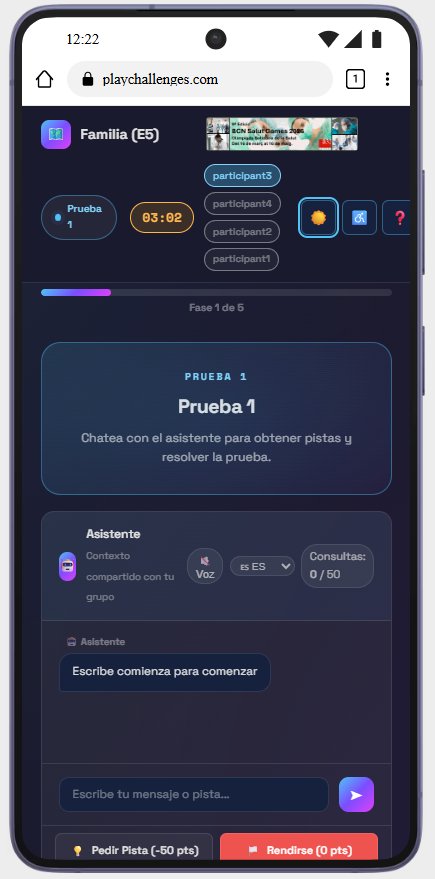
The first thing they see is their participant dashboard with essential info: team name, current challenge, countdown timer, a progress bar showing their phase (e.g., "Phase 1 of 5"), and teammate names. Everything in a dark theme to reduce visual fatigue.
The AI challenge
A chat similar to any messaging app. An AI assistant provides context, presents the challenge, and responds to messages. The AI evaluates answers and gives immediate feedback.
The hint system
Two key buttons: "Request Hint (-50 pts)" and "Give Up (0 pts)." This mechanic creates a constant strategic decision.
Voice
The voice option lets the AI read questions aloud. Useful for people with visual difficulties or when walking through a city during a scavenger hunt.
When it's over
Results screen: total time, score, hints used, ranking position, and the option to download AI conversation transcripts.
Want to see it in action? Try PlayChallenges free and create your first event in minutes.